Taking the step to protect your digital legacy and organize your final wishes can feel overwhelming at first. However, at TestaDigi we designed every part of the platform with one obsession: making it so simple, intuitive, and secure that you can have everything ready in under 5 minutes.
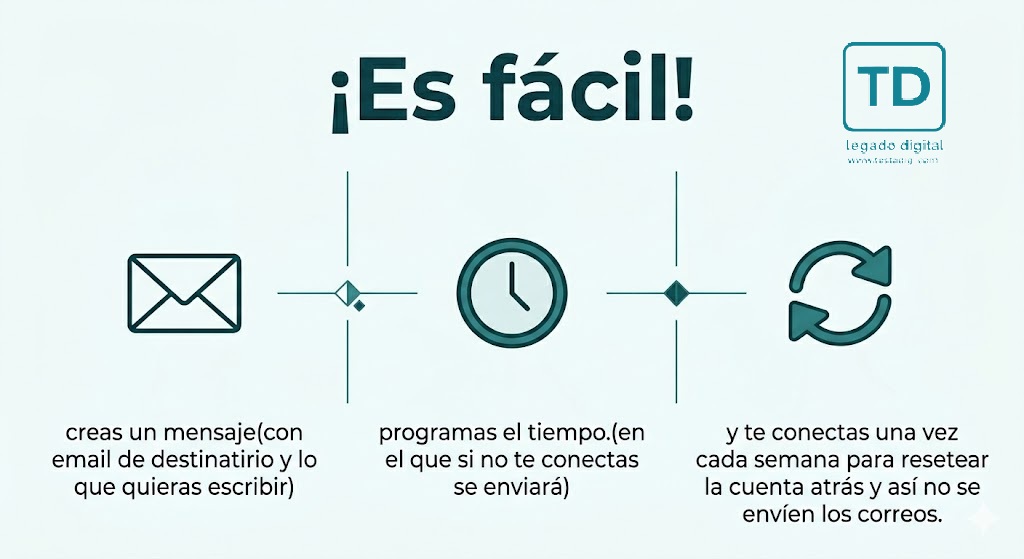
No technical background or complicated setups required. Here is the full process explained in just 3 straightforward steps:
Step 1: Write your message and attach what matters most
From your dashboard, click the "Create New Message" button. Here you can record everything your loved ones or business partners will need in the future:
- Confidential content: Write personal letters of farewell, key explanations, the location of physical keys or safe deposit boxes, or the master password to your password manager.
- Specific recipients: Add one or multiple email addresses. Each scheduled alert can be tailored for different people (e.g., a private letter for your partner, one for your children, and another for your business partners).
- Secure file attachments: Upload ID copies, scanned deeds, cherished family photo albums, or encrypted recovery key files.
Step 2: Set your inactivity timer and enable preventive alerts
At the core of TestaDigi lies our smart timer (Dead Man's Switch). You have complete freedom to choose how often you wish to confirm that everything is fine:
- Choose your ideal frequency: Configure the timer anywhere from a few hours or days (perfect for solo travel or adventure sports) to 30 days, 3 months, 6 months, or 1 year for long-term legacy planning.
- Tiered advance alerts (25%, 10%, and 5%): For your total peace of mind, TestaDigi will never send a message by surprise. As your timer approaches expiration, our system automatically emails you and sends mobile push notifications when 25%, 10%, and 5% of your remaining time is left, giving you ample time to renew with a single click.
Step 3: Keep your account active the way you prefer
And that's it! Once your message is saved, all you need to do is live your normal life. To reset your timer and postpone delivery, you have 3 effortless options:
- Automatic Biometric Unlock (Recommended): Install our Android app, and every time you unlock your smartphone with your fingerprint or face, the timer resets invisibly in the background. Zero effort!
- One-click email link: When you receive a reminder email, simply tap the "I'm fine / Reset timer" button to update your account instantly without needing to log in.
- Web dashboard login: Log into your account anytime from your PC, tablet, or phone to review alert statuses and add new messages.
Pro Tip: Pause your alerts whenever you need to
If you are traveling to a remote location without cell reception, unplugging for a holiday, or going into surgery, you can visit your dashboard and hit "Pause" on your alerts. They will remain frozen in time until you choose to resume them manually.